Month: November 2014

Visual Studio Data Tools Schema Compare does not work against Basic edition SQL Azure databases

Before you spend any time banging your head against the wall on this, please note that SQL Data Tools schema comparisons do not work against SQL Azure Basic databases. It will fail with some kind of timeout error. Do not be tempted to start messing with your default SQL timeouts. The default is already 60 seconds and thats plenty of time for almost everything you will encounter.

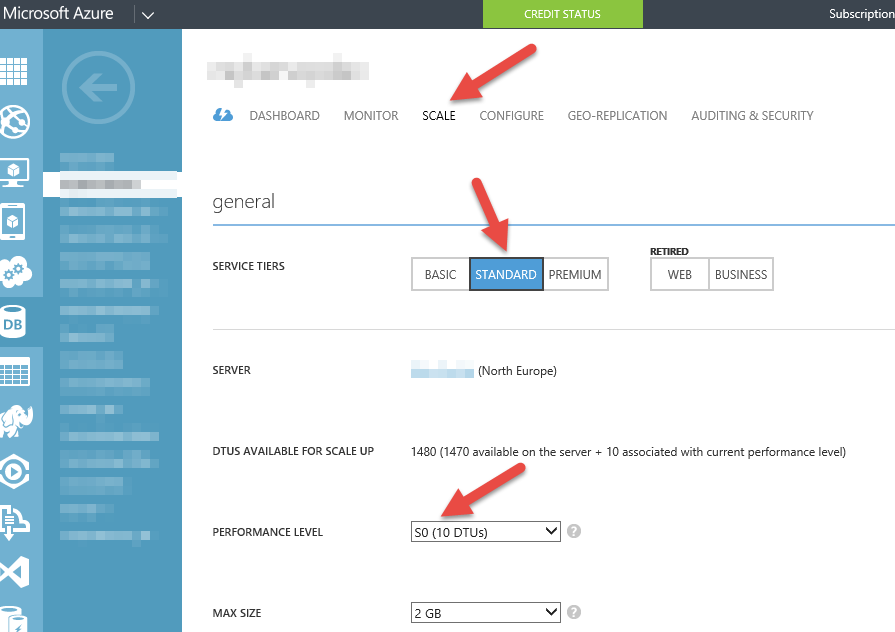
To change your edition (and there are many reasons to, not least point in time continuous backups and geo replication), you will need to go to the Scale tab on your database and select at least a Standard subscription type.
 

Azure Mobile Services prompt for login when clicking on ‘try it out’

Could not work out how what to do about this, but found this solution (http://blogs.msdn.com/b/musings_on_alm_and_software_development_processes/archive/2014/10/23/azure-mobile-services-prompts-you-for-a-username-and-password.aspx).

Use one of your access keys in the password field, leaving the username blank.

Then you can browse to the /help url for your mobile service.

Getting access to and using Visual Studio code snippets with Resharper installed

When you first install Resharper, your Visual Studio code snippets are imported into Resharpers ‘Live Templates’. This is all very well until you install, update or create new Visual Studio code snippets.

If you have ever wondered how to use the Visual Studio code snippets when you have Resharper installed then here is the quick solution.

Press CTRL+J and then start typing the code snippet shortcut you are after. You will now see the list of available Visual Studio code snippets.

You can find this mentioned here http://www.jetbrains.com/resharper/webhelp/Templates__Applying_Templates__Inserting_Imported_Code_Snippets.html